
Today, we are excited to introduce more advanced coding capabilities in Agent Mode with GitHub. Agent Mode now offers a web-based coding agent that becomes a full-featured, GitHub-connected development environment. This lets you get real work done, quickly going from idea to shipped feature in a matter of minutes.
The Next Step in Agentic Coding
When we first built Agent Mode, our goal was to create an interface that could reason through complex tasks. However, real-world coding rarely happens in isolation. Developers don't just write code; they manage repositories, review diffs, push commits, and open pull requests.
For a coding agent to be truly useful, it needs to live where the work is: on GitHub. By integrating directly with GitHub and reusing the underlying infrastructure of Agent Mode, we’ve created a seamless experience that allows you to connect a repo, complete a coding task, and push the results—all without leaving your browser. Whether you’re building a new site for your coffee shop, coding the next great interactive video game, or creating a locator and menu app to drive traffic to your food truck, you can now build in Agent Mode and push changes to GitHub.
How It Works: A GitHub-First Workflow
We’ve overhauled our Agent Mode architecture to support deep repository integration. This isn't just about writing code; it's about managing a workflow, allowing developers to connect to existing projects or code repos.
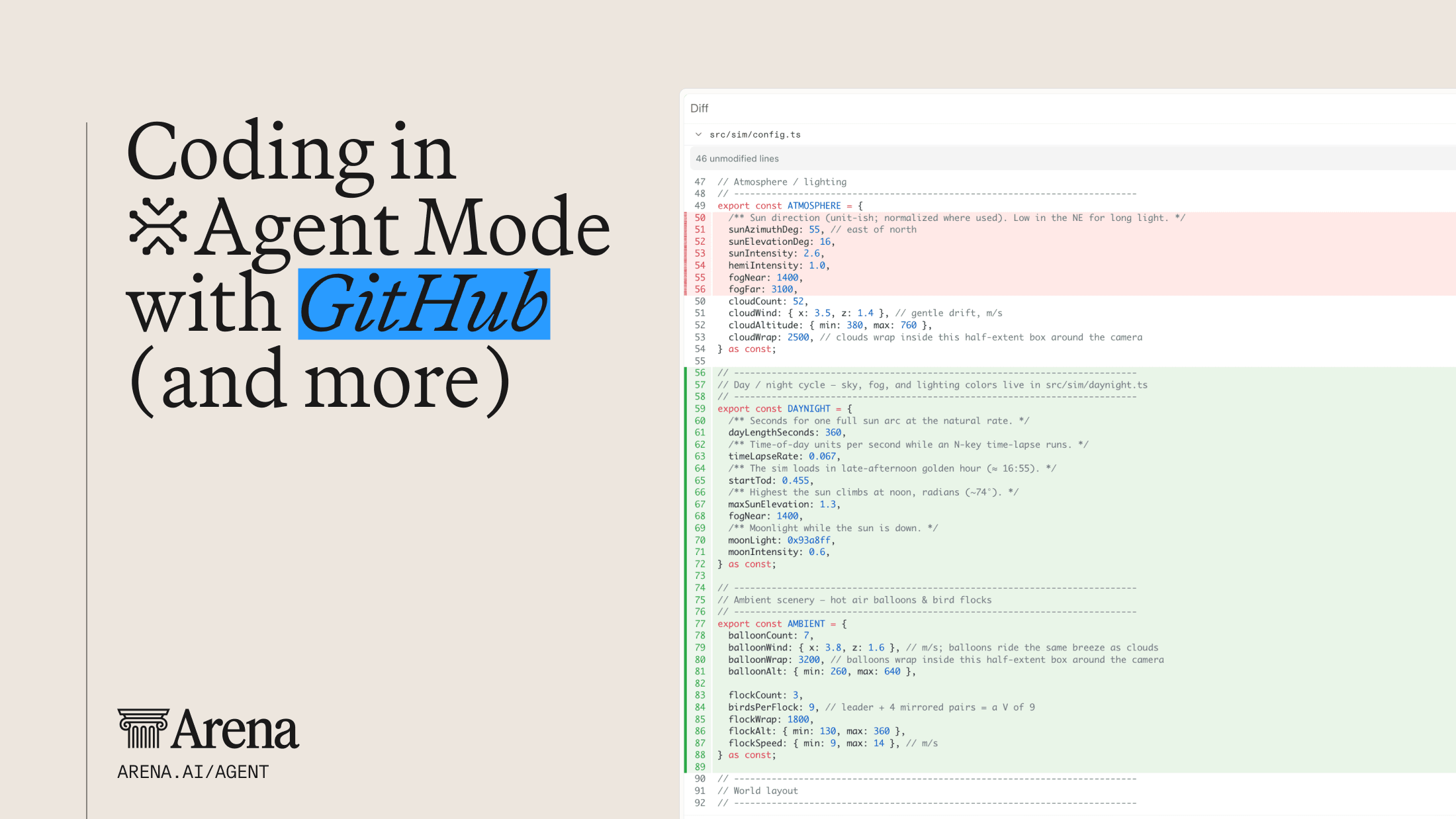
Once you’re in Agent Mode, it’s now as simple as flipping on the GitHub Connector with a single click, picking a repo and a branch, and you’re ready to go - just prompt the agent for anything you want, whether that’s building a new feature or fixing a bug. Once you submit your prompt, the agent starts reading the codebase, editing files and running commands to execute on your request. All of these changes are shown live in the diff panel on the right side of the UI, tracking every line of code that gets added or removed. Once completed, you can now preview your app right in Agent Mode, without ever having to leave your browser window.
Once ready, you can push the changes and immediately create a pull request in GitHub. You can then confirm and merge the changes, which are all tracked live in your Agent Mode session!
Specific new features include:
- GitHub OAuth connector: Securely authenticate and list your repositories directly within the workspace.
- Sandbox-based cloning: We now clone your repo into a sandbox at the start of a session, giving the agent a clean, isolated environment to explore and edit your code.
- Diff review panel: Forget hunting through text outputs. Our new dedicated diff panel lets you watch the agent work in real-time, toggle between "last turn" and "full branch" diffs, and inspect syntax-highlighted changes.
- Git lifecycle support: From cloning to commit, push, and PR creation, the agent handles the heavy lifting, allowing you to focus on review and approval.
Why Dedicated Tools Matter
You might ask, "Why build dedicated tools when bash works fine?"
Bash is great for executing commands, but reliable coding agents need more than command execution. Dedicated tools give agents structured, predictable primitives for interacting with your codebase and infrastructure:
- First-class integration with GitHub to create PRs, inspect diffs, push commits, and merge changes.
- Run agent-generated code in disposable cloud environments instead of directly on your local machine.
- Easily manage a team of agents and associated task execution.
- Ease of spinning up new tasks in isolated work sessions quickly.
- Test and run development servers and applications in the same environment where the agent edits the code, with serving ports for previewing and debugging.
The Future of Coding in the Browser
Coding in Agent Mode isn't just a collection of new coding features — it’s a commitment to making AI a collaborative partner in your development lifecycle and helping developers to get more real world work done. By focusing on GitHub integration and dedicated, tool-driven interactions, we’re removing the friction between "chatting” about code and actually building. So far, we’ve seen users leverage the agent to build ecommerce stores, design trip planners, prototype interactive games, or simply accelerate their coding tasks and iterate on ongoing projects. This is just the beginning of the journey, as we plan to continue to bring additional features and functionality to the Agent Mode experience in the future.
Ready to try it out? Connect your GitHub account in Agent Mode with a single click and experience having an AI developer who can push directly to your main branch.